Healthcare Cloud Computing Compliance Explained for Practices

Healthcare cloud computing compliance is the process of meeting HIPAA Security Rule requirements when your practice stores, transmits, or processes electronic protected health information (ePHI) through cloud infrastructure. The industry term for this discipline is HIPAA cloud compliance, and it applies the moment any cloud provider, whether AWS, Microsoft Azure, or Google Cloud, touches patient data on your behalf. Cloud providers are classified as business associates under HIPAA, which means a signed Business Associate Agreement (BAA) is mandatory before any ePHI workflow goes live. Penalties for non-compliance range from $100 to $50,000 per violation, and a single misconfigured storage bucket can trigger a reportable breach. Understanding where your obligations begin and where your vendor’s end is the core challenge every healthcare administrator faces.
What are the core HIPAA safeguards for cloud computing in healthcare?
The HIPAA Security Rule organizes its requirements into three categories of safeguards: administrative, physical, and technical. Each category contains both required specifications, which are non-negotiable, and addressable specifications, which require documented justification if not implemented. Cloud environments touch all three categories simultaneously, which is why a piecemeal approach to compliance always fails.
Administrative safeguards are the governance layer of your compliance program. The Security Management Process requires a documented risk analysis and an active risk management plan as required specifications. Your practice must also maintain workforce training records, designate a security officer, and document contingency plans covering data backup, disaster recovery, and emergency mode operations. These are not one-time tasks. They require scheduled reviews tied to changes in your cloud environment.

Physical safeguards address facility access and device controls. In a cloud context, your provider contractually covers data center physical security, including locked server rooms, surveillance, and hardware disposal. Your responsibility shifts to workstation controls, mobile device policies, and endpoint management for any device that accesses cloud-hosted ePHI.
Technical safeguards are where most cloud-specific work concentrates:
- Access controls: Assign unique user IDs, implement automatic logoff, and use role-based access control (RBAC) to limit ePHI exposure to minimum necessary.
- Audit controls: Record and examine activity in systems containing ePHI. Cloud platforms like AWS CloudTrail and Azure Monitor provide native audit logging that must be configured and retained.
- Transmission security: AES-256 encryption at rest and TLS 1.2+ in transit are the accepted standards for securing ePHI in cloud storage and data transfer.
- Integrity controls: Implement mechanisms to confirm ePHI has not been improperly altered or destroyed, such as file hashing and version control.
Pro Tip: Addressable does not mean optional. If you choose not to implement an addressable specification, you must document why an equivalent alternative measure achieves the same protection. Auditors treat undocumented decisions as violations.
How does the shared responsibility model affect healthcare cloud compliance?
The shared responsibility model defines which security controls your cloud provider manages and which ones your practice owns. This division is the most misunderstood aspect of cloud compliance in healthcare, and it is where most regulatory exposure originates.
Here is how the split typically works in a HIPAA-covered cloud deployment:
- Provider-managed controls: Physical data center security, hypervisor integrity, network infrastructure hardening, and hardware redundancy. AWS, Azure, and Google Cloud each publish detailed compliance documentation covering these layers.
- Customer-managed controls: Identity and access management (IAM) configurations, data encryption key management, audit log retention settings, network security group rules, and application-level access controls.
- Shared controls: Patch management (provider patches infrastructure, customer patches OS and applications), data classification, and incident response coordination.
- Contractual obligations: Mapping provider-managed versus customer-managed controls must be documented in your risk analysis and reflected in your BAA scope.
The critical legal point: your cloud provider being HIPAA-compliant does not make your deployment compliant. Regulatory liability stays with the covered entity, meaning your practice. A provider can have SOC 2 Type II certification and a signed BAA and still leave your ePHI exposed if your team misconfigures an S3 bucket or sets IAM permissions too broadly. Censinet’s analysis of healthcare cloud breaches confirms that customer-side misconfigurations are the leading cause of HIPAA failures in cloud environments, not provider security gaps.
Pro Tip: Build a control ownership matrix in a spreadsheet or GRC tool. List every HIPAA Security Rule specification, mark it as provider-owned, customer-owned, or shared, and link it to the specific configuration or policy that satisfies it. This document becomes your primary audit evidence.
What practical steps should healthcare organizations take to ensure cloud compliance?
Moving from understanding to execution requires a structured workflow. The following steps reflect the sequence that Businessitsupport recommends for medical and dental practices adopting cloud infrastructure.
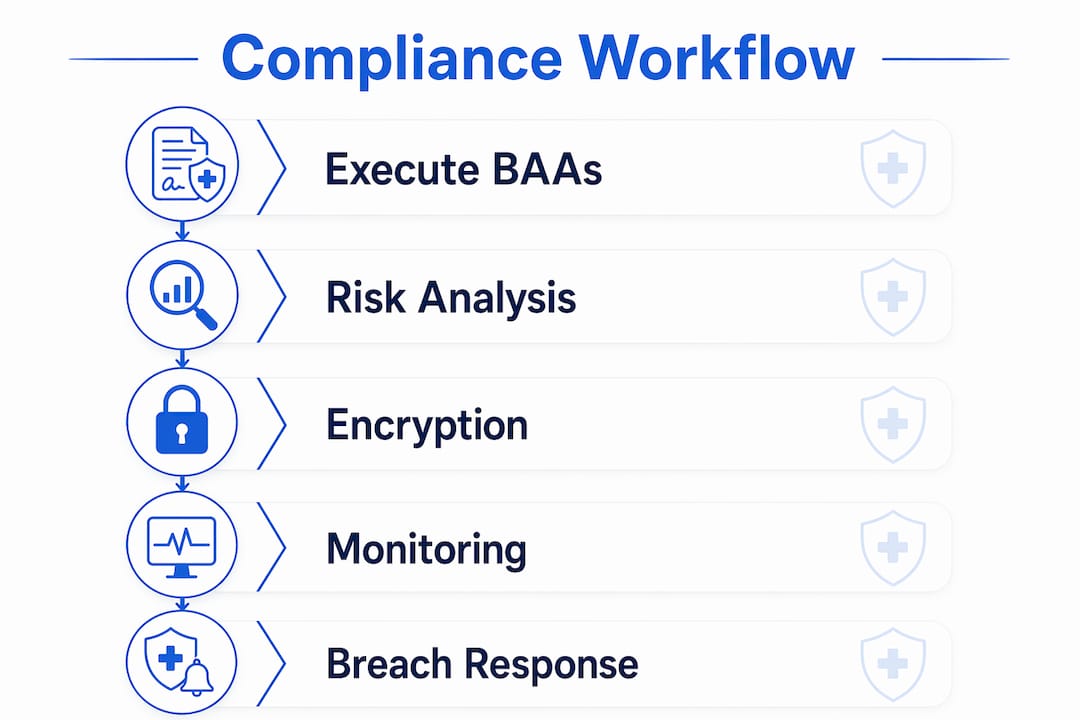
Execute BAAs before any ePHI touches the cloud
BAA execution requires scope determination, evaluation, negotiation, and ongoing review. The agreement must specify permitted uses of ePHI, breach notification timelines (no later than 60 days from discovery), and data handling procedures including destruction at contract end. Records must be retained for six years. Do not assume a provider’s standard terms include a BAA. Request it explicitly, review the breach notification clause carefully, and confirm it covers all subprocessors your provider uses.
Conduct a cloud-focused risk analysis
Your risk analysis must inventory every cloud asset that stores or processes ePHI, including virtual machines, databases, object storage buckets, and API endpoints. Assign a likelihood and impact score to each identified threat. Document your risk management plan with specific remediation tasks, owners, and deadlines. Given how frequently cloud environments change, quarterly risk register reviews are the current best practice, not annual assessments.
Apply encryption and access controls consistently
| Control | Standard | Scope |
|---|---|---|
| Encryption at rest | AES-256 | All ePHI storage: databases, object storage, backups |
| Encryption in transit | TLS 1.2 or higher | All API calls, web traffic, and data transfers |
| Multi-factor authentication | TOTP or hardware key | All accounts with ePHI access |
| Role-based access control | Least privilege | IAM roles scoped to minimum necessary permissions |
| Key management | Customer-managed keys | Preferred for highest-sensitivity ePHI workloads |
Implement continuous monitoring and audit log management
Recurring audit log reviews aligned with your risk management plan satisfy HIPAA’s information system activity review requirement. Configure alerts for anomalous access patterns, failed authentication attempts, and configuration changes to security groups or encryption settings. Tools like Microsoft Sentinel and SentinelOne integrate with cloud-native logs to provide real-time detection across your environment.
Prepare breach notification workflows
Your incident response plan must define detection, containment, assessment, and notification steps. Align your internal timeline with your BAA’s notification clause so that when a potential breach is identified, your team knows exactly when and how to notify your provider and, if required, the Department of Health and Human Services and affected patients.
What are common compliance pitfalls in healthcare cloud adoption?
The gap between having a BAA and being genuinely compliant is wider than most administrators expect. These are the failure points that appear most frequently in HIPAA enforcement actions and breach reports.
- Missing or incomplete BAAs: Practices often sign a BAA with their primary cloud provider but overlook subcontractors. If your cloud vendor uses a third-party backup service that touches ePHI, that subcontractor also needs a BAA.
- Overly permissive IAM policies: Granting administrator-level access to accounts that only need read access is one of the most common misconfigurations. Overly permissive IAM policies and unencrypted storage are cited repeatedly in breach investigations.
- Unencrypted storage buckets: Object storage services default to no encryption in some configurations. Every bucket, volume, and database instance containing ePHI must have encryption explicitly enabled, not assumed.
- Inconsistent audit logging: Audit logs that are enabled but never reviewed provide no compliance value. Worse, logs that are not retained for the required period create gaps in your evidence trail during an investigation.
- Data residency blind spots: Multi-cloud and hybrid environments can route ePHI through regions or jurisdictions unexpectedly. Confirm data residency settings in every service your practice uses.
- Infrequent workforce training: Staff who do not understand phishing risks or proper credential hygiene create vulnerabilities that no technical control fully compensates for.
“HIPAA-compliant cloud storage is not a certification but a shared responsibility requiring contractual agreements and correct technical configurations.” — AXIS CloudSync
This framing matters because it shifts the mental model from a checkbox exercise to an ongoing operational discipline. Compliance is not a state you achieve. It is a condition you maintain.
How does automation support ongoing healthcare cloud compliance?
Automation addresses the single biggest weakness in manual compliance programs: human consistency. When your team manages dozens of cloud resources across multiple services, a single missed configuration check can create a compliance gap that persists for months undetected.
Infrastructure as code (IaC) with policy-as-code validation encodes your compliance requirements directly into your deployment process. Tools like Terraform and Pulumi, combined with policy engines such as Open Policy Agent, reject non-compliant configurations before they reach production. Encryption settings, audit logging, and network controls are enforced at the point of deployment, not discovered in a quarterly audit.
Key automation capabilities that directly support HIPAA cloud compliance:
- Continuous configuration monitoring: Platforms like AWS Config and Azure Policy continuously evaluate resource configurations against defined compliance rules and alert on drift.
- Automated risk register updates: Integrating cloud asset inventory tools with your GRC platform keeps your risk analysis current as new services are provisioned.
- AI-driven anomaly detection: Microsoft Sentinel and SentinelOne use behavioral analytics to detect unusual access patterns in ePHI systems, reducing mean time to detection for potential breaches.
- CI/CD pipeline compliance gates: DevSecOps approaches treat deployment pipelines as part of the compliance boundary, securing credentials and generating audit evidence for every PHI-touching workflow change.
Pro Tip: Start with AWS Config or Azure Policy before investing in third-party GRC tools. Native cloud compliance monitoring is free within most enterprise tiers and provides immediate visibility into your most critical configuration risks.
Key takeaways
Healthcare cloud compliance requires continuous, documented control ownership across both provider-managed and customer-managed layers, not a one-time BAA signature.
| Point | Details |
|---|---|
| BAAs are mandatory and detailed | Every cloud vendor touching ePHI needs a signed BAA covering breach timelines, permitted uses, and subprocessors. |
| Shared responsibility is your liability | Providers secure infrastructure; your practice owns IAM, encryption keys, and audit log configuration. |
| Encryption standards are specific | AES-256 at rest and TLS 1.2+ in transit are the accepted minimums for all ePHI in cloud environments. |
| Risk analysis must be frequent | Quarterly reviews of your cloud risk register reflect the pace at which cloud environments change. |
| Automation reduces human error | IaC with policy-as-code validation enforces compliance guardrails at deployment, before misconfigurations reach production. |
What we’ve learned working with healthcare practices on cloud compliance
The practices that struggle most with HIPAA cloud compliance share one pattern: they treat the BAA as the finish line. Once the agreement is signed and the data is in the cloud, attention shifts elsewhere. Six months later, an audit or a breach reveals that IAM permissions were never tightened, audit logs were enabled but never reviewed, and the risk analysis was never updated after three new cloud services were added.
The providers who maintain clean compliance records do something different. They treat their control ownership matrix as a living document. They schedule quarterly risk register reviews the same way they schedule equipment maintenance. They invest in tools like Microsoft Sentinel to make monitoring continuous rather than periodic. And they hold their cloud vendors accountable to the BAA terms, not just at signing but through annual reviews.
The other insight that consistently surprises administrators: automation is not a luxury for large health systems. A two-physician practice running on Azure can configure Azure Policy in an afternoon and have continuous compliance monitoring running by end of day. The barrier is not cost or complexity. It is knowing what to configure and why. That is exactly the gap that a specialized IT partner fills.
Security is not an add-on to your cloud strategy. It is the foundation it has to be built on from day one.
— Businessitsupport
How Businessitsupport helps healthcare practices achieve cloud compliance
Healthcare practices in Phoenix and beyond face real pressure to adopt cloud technology while keeping ePHI protected and audits clean. Businessitsupport specializes in HIPAA-compliant cloud infrastructure for medical, dental, and chiropractic practices, building every engagement on Zero Trust principles from the start.
Our managed cybersecurity services include continuous monitoring through Microsoft Sentinel and SentinelOne, automated configuration compliance checks, BAA review support, and incident response planning tailored to your practice size. We speak HIPAA fluently, and we handle the technical complexity so your team can focus on patient care. Contact Businessitsupport to schedule a cloud compliance assessment for your practice.
FAQ
What is a Business Associate Agreement in cloud computing?
A Business Associate Agreement (BAA) is a required contract between a covered healthcare entity and any cloud provider that stores or processes ePHI. It must specify permitted uses, breach notification timelines, and data handling obligations, with records retained for six years.
Does signing a BAA make my cloud deployment HIPAA compliant?
No. A signed BAA establishes the contractual relationship but does not configure your environment. Your practice remains responsible for IAM settings, encryption, audit logging, and all other customer-managed controls.
How often should a healthcare organization conduct a cloud risk analysis?
Quarterly reviews are the current best practice for cloud environments, given how frequently new services are provisioned and configurations change. Annual assessments alone do not reflect the pace of cloud adoption.
What encryption standards apply to ePHI in the cloud?
AES-256 encryption at rest and TLS 1.2 or higher in transit are the accepted standards for securing ePHI stored in or transmitted through cloud infrastructure.
What is the most common cause of HIPAA breaches in cloud environments?
Customer-side misconfigurations, including overly permissive IAM policies, unencrypted storage, and missing audit log retention, are the leading cause of HIPAA compliance failures in cloud deployments, not provider security failures.
Recommended
- HIPAA-Compliant IT & EMR Implementation Phoenix | Medical, Dental, Chiropractic | Business IT Support
- Business IT Support | Security-First Managed IT for Healthcare & Law Firms in Phoenix
- HIPAA & ABA-Compliant IT Services Phoenix | Managed IT, Cybersecurity, EMR, Legal Software & Marketing | Business IT Support
- Cybersecurity Services Phoenix | MDR, HIPAA Compliance & Zero Trust for Healthcare & Law Firms | Business IT Support